Post Card Filters for Avada Builder

Cart
Post Card Filters for Avada Builder

$50.00

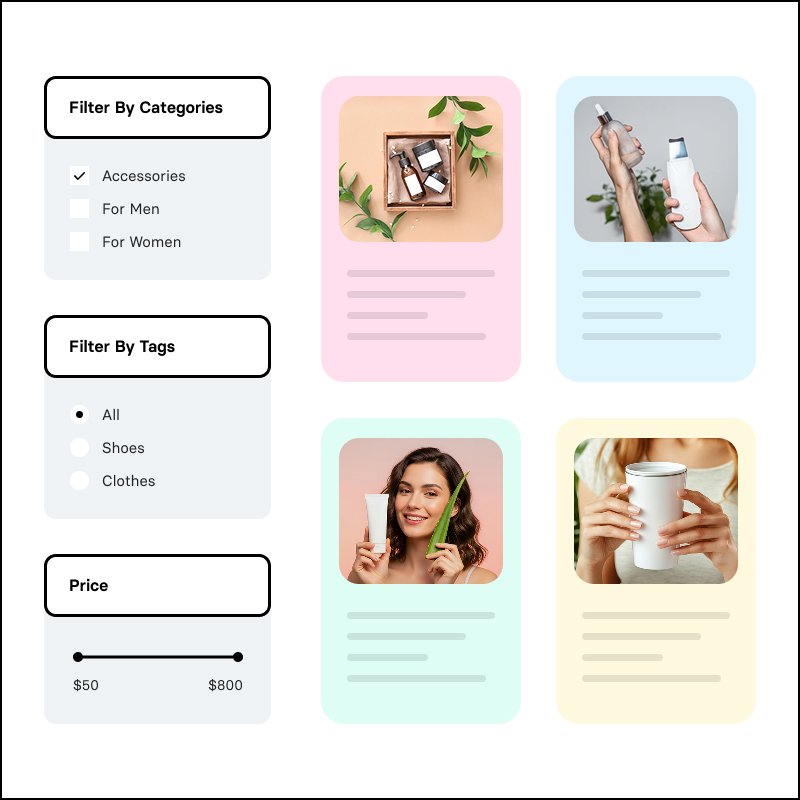
Post Card Filters for Avada Builder adds powerful Avada filters for Post Cards directly in the Live Builder. Filter by categories, tags, custom fields, and WooCommerce (price, stock, rating) with dropdowns, checkboxes, radio buttons, sliders, and more. Show active filter tags, clear-all and presets, and keep everything in sync with your saved Post Card design—no coding required. Post Card Filters for Avada Builder adds powerful filters for Post Cards Element. Filter by taxonomies and custom fields with dropdowns, checkboxes, radio buttons, range sliders, and more. Show active filter tags, clear-all and presets, and keep everything in sync with your saved Post Card design.

Post Card Filters for Avada Builder

Post Card Filters for Avada Builder adds native-style filtering to Avada’s Post Cards element. Build Avada filters for Post Cards for: taxonomy, custom field, and WooCommerce filters that stay in sync with your saved Post Card design and update results in real time.

Why Use Avada Filters for Post Cards?

Avada’s Post Cards element is ideal for blogs, portfolios, and product grids, but built-in filtering is limited. This plugin adds Avada filters for Post Cards directly in the page, pick your Post Card design, add filter groups (taxonomy, custom field, or WooCommerce), choose a display type, and publish. Visitors get instant filtering and a clear view of active filters.
Features of Post Card Filters for Avada

  • Taxonomy filters – Filter by categories, tags, product categories, or any public taxonomy. Include or exclude specific terms. Display as dropdown (with search for long lists), checkbox, radio, or color swatches.

  • Custom field filters – Filter by any post meta; ACF Pro field names supported. Display as dropdown, dropdown with checkboxes, checkbox, radio, text, number range, range slider (manual or auto min/max), date, or color swatches.

  • Filter Logic – Filter by any or all filter logic. Basically the regular OR and AND logic for Dropdown with Checkboxes field and Checkbox field.
  • WooCommerce filters – Price range (inputs or slider), stock status, on sale, featured, and average rating. Works with product Post Cards.

  • Active filters display – Show selected filters as removable tags and a “Clear all” button so users see and control what’s applied.

  • Filter presets – Optional one-click buttons (e.g. “On sale”, “Under $500”) that apply a saved filter state or clear filters.

  • Layout & mobile – Vertical or horizontal layout. On mobile, optionally use a collapsible “Filter” panel with active tags above the trigger.

  • Design controls – Extensive style options for filter titles, dropdowns, radio/checkbox labels, borders, spacing, and range sliders from the Design tab to match your theme.

  • Conditional filters – Show a filter only when another has specific values (e.g. show “Model” only when “Brand” is selected).

Who can use Post Card Filters for Avada?

  • Only websites using Avada and displaying blogs, portfolios, listings, or shops or any CPTs through Post Cards Element.

  • Anyone who wants Avada filters for Post Cards without custom code
  • WooCommerce stores that need product filtering (price, stock, rating) on Post Card Grid

  • Websites using ACF Pro plugin or other custom fields who need filterable meta (beds, status, date, etc.)

FAQS

Post Card Filters for Avada Builder is a WordPress plugin that adds advanced filtering capabilities to Avada’s Post Cards Element. It allows visitors to filter posts, pages, custom post types, listings, and WooCommerce products using taxonomies, custom fields, and WooCommerce-specific filters.

Yes. The plugin is designed specifically for Avada Builder and works with the Post Cards Element. You can configure your filters directly alongside your Post Card layout without replacing Avada’s existing Post Cards functionality.

You can create filters based on:

Categories and tags
Custom taxonomies
Custom fields and post meta
ACF Pro fields
WooCommerce price
Stock status
Products on sale
Featured products
Average product rating

Depending on the filter source, you can use dropdowns, dropdowns with checkboxes, checkboxes, radio buttons, text fields, number ranges, range sliders, date filters, and color swatches.

Yes. WooCommerce filtering is supported when your products are displayed using Avada’s Post Cards Element. You can filter products by price, stock status, sale status, featured status, and average rating.

Yes. You can use ACF Pro field names to create filters based on your custom field data. This makes the plugin suitable for directories, real estate listings, portfolios, catalogs, and other custom post type websites.

No. The plugin is specifically designed for websites using Avada Builder and the Post Cards Element. It is not intended to provide generic filtering for other page builders or themes.

Purchase it, install and activate the plugin on your Avada website, then add the Post Card Filters functionality to your page and configure your filter groups. Select the appropriate taxonomy, custom field, or WooCommerce filter and choose how you want it displayed.

If the element isn’t available in Avada Builder then likely the element needs to be enabled in the Builder Options of Avada.

Related products